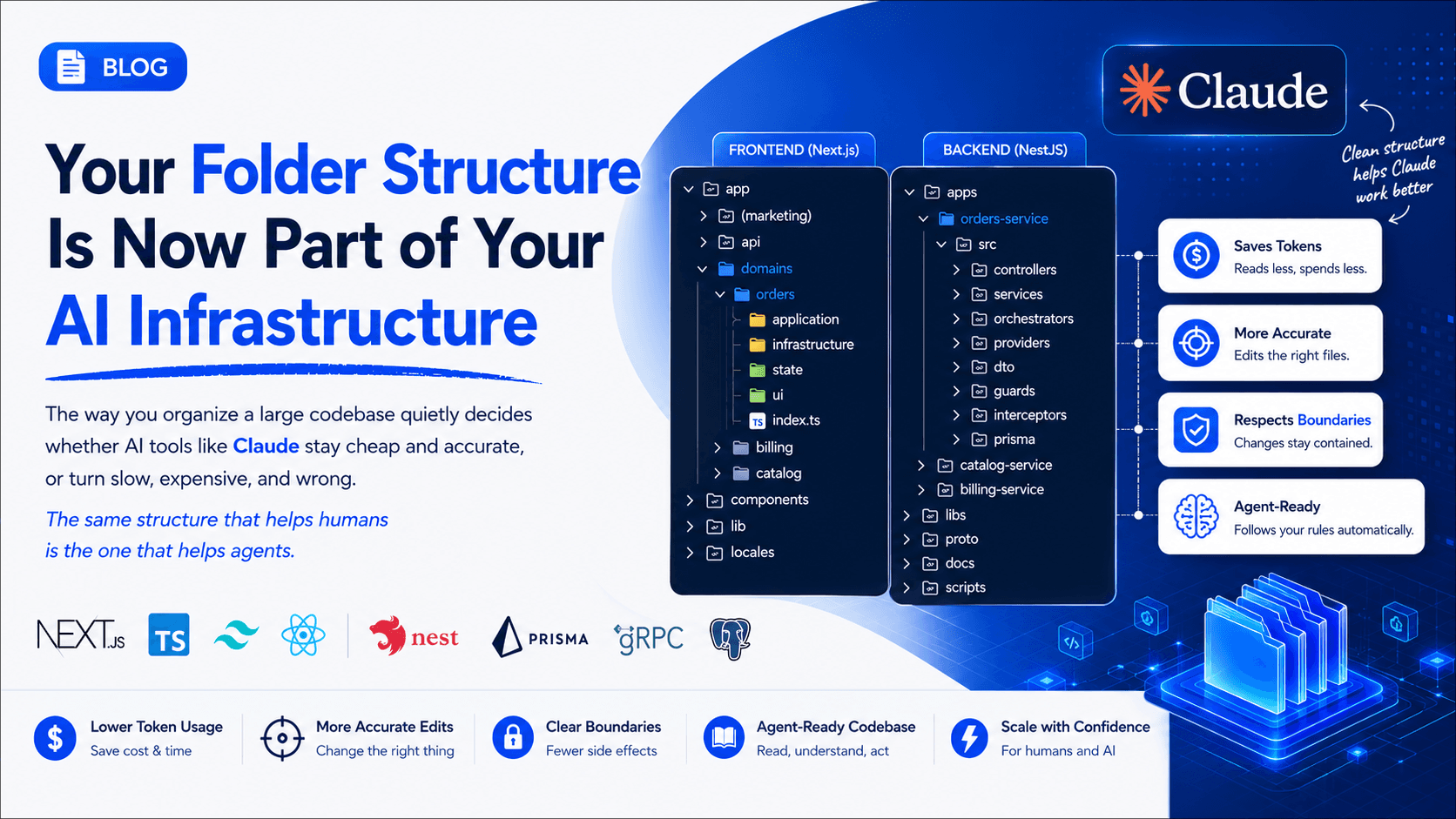
Your Folder Structure Is Now Part of Your AI Infrastructure
The way you organize a large codebase quietly decides whether AI tools like Claude stay cheap and accurate, or turn slow, expensive, and wrong. The same structure that helps humans is the one that helps agents
The problem nobody warns you about
When a project is small, everything is fine. You know where every file lives. AI coding tools feel magical because they can "see" enough of the project to actually help.
Then the codebase grows. A handful of services. Dozens of features. Thousands of files. And two things break at the same time:
- Humans get lost. New engineers spend days just learning where things are.
- AI gets expensive and dumb. Every question forces the agent to read half the repo just to find context. Tokens burn, answers drift, and "fix this bug" edits the wrong file.
Here's the idea that changes everything:
The folder structure that makes a codebase easy for humans is the exact same structure that makes it cheap and accurate for AI.
To make this concrete, I looked at two well-organized production codebases as examples — a frontend web app (Next.js) and a backend microservices platform (NestJS). The specific folder names don't matter; the patterns do. Let's walk through them, then connect each one to a real AI benefit.
Example 1 — A frontend web app (Next.js)
The important part isn't the framework. It's how the app separates routing from business logic from UI. A representative layout looks like this:
app/
├── (marketing)/          # public pages (route group)
├── api/                  # server routes, grouped by resource
│   └── orders/  auth/  billing/  ...
├── domains/              # ⭐ business logic, one folder per feature
│   ├── orders/
│   │   ├── application/      # use-cases & hooks (what it DOES)
│   │   ├── infrastructure/   # http, error mapping (talking to backend)
│   │   ├── state/            # client state
│   │   ├── ui/               # view-models: list, detail, checkout
│   │   └── index.ts          # the public surface of the feature
│   ├── billing/
│   └── catalog/
├── components/
│   ├── ui/               # design-system primitives (reused everywhere)
│   └── orders/  billing/  ...
├── lib/                  # shared helpers (auth, validation, rbac)
└── locales/              # i18n
The most valuable idea here is the domains/ folder. Each feature is a self-contained slice with the same layers every time:
application/— the use-cases (what the feature does)infrastructure/— how it talks to the outside worldstate/— client-side stateui/— the shapes that feed componentsindex.ts— a deliberate public API; everything else stays private
Because the shape is identical across every feature, once you understand orders/, you understand billing/ and catalog/ for free. That predictability is worth more than any clever abstraction.
Example 2 — A backend microservices platform (NestJS)
The backend is a monorepo of small, independently-deployable services that share a common library layer:
apps/                     # each app is a deployable service
├── gateway/              # auth, routing, rate limiting
├── orders-service/       # bookings, payments, lifecycle
│   └── src/
│       ├── controllers/  services/  orchestrators/   # request → logic → flow
│       ├── providers/                                 # 3rd-party adapters
│       ├── dto/  guards/  interceptors/
│       └── prisma/                                    # this service's own DB
├── catalog-service/
└── billing-service/

libs/                     # ⭐ shared code — the contract layer
├── shared/               # auth, http transport, redis, logging, pagination
└── contracts/            # shared types used across services

proto/                    # the wire contract between services (gRPC)
docs/                     # architecture + one doc per service
scripts/                  # dev / build / codegen automation
Three rules make this scale:
- One responsibility per service. Orders don't know how catalog works. Each service owns its own database. Blast radius stays small.
- Shared truth lives in
libs/, not copy-paste. Auth, HTTP, caching, pagination — written once, imported everywhere. Change a contract in exactly one place. - Boundaries are written down.
proto/defines the wire format;contracts/defines shared types. The seams between services are explicit, not implied.
Inside each service the layering repeats: controllers handle the request, services hold the logic, orchestrators coordinate multi-step flows, and providers hide every third-party integration behind an adapter — so swapping a vendor never leaks into your business logic.
How to actually handle "big"
Structure alone isn't enough. A few principles keep a large repo sane:
- Group by feature, not by file type. Put everything about
orderstogether, instead of a giant top-levelcontrollers/andmodels/. Most changes then live one folder deep. - Repeat the same shape everywhere. Learn the pattern once, apply it to every feature and service.
- Give each module a public surface. An
index.tsbarrel (or exported types) decides what's visible and hides the rest. This is what stops a big codebase from turning into spaghetti. - Keep docs next to the code. Docs in a separate wiki die. Docs beside the thing they describe stay alive.
- Automate the guardrails. Lint rules, pre-commit hooks, and CI checks. A rule that isn't enforced is just a suggestion.
The payoff: why this makes AI cheap, fast, and accurate
Here's the part most teams miss. Everything above wasn't only for humans. A clean structure is the single biggest lever on how well AI agents perform on your code — and it shows up three ways.
1. It saves tokens (which is money and speed)
An AI agent has a limited context window, and every token it reads costs money and time. In a messy repo, "fix the pricing calculation" forces the agent to grep across dozens of unrelated files just to find where the logic lives.
In a clean structure, that same request routes straight to one predictable path. The agent reads hundreds of lines, not tens of thousands.
The structure creates token locality:
- Predictable paths → the agent finds the file by name, not by reading everything.
index.tspublic surfaces → it understands a module from one barrel file.- Shared
libs/andproto/→ one authoritative place to learn a contract, instead of guessing from ten call sites. - Small, single-purpose services → the whole relevant world for a task fits in context.
Less reading → fewer tokens → lower cost and faster answers. A task that eats 50k tokens in a tangled repo can take 5k in a well-partitioned one.
2. It makes fixes accurate, not just fast
When boundaries are explicit, an AI's change stays contained. If orders logic physically can't reach into catalog logic, an agent fixing an orders bug cannot break catalog — the structure fences it in. Because every vendor hides behind an adapter, an integration fix lands in one folder and nowhere else.
Predictable layering also tells the agent which layer to touch: a validation bug goes in dto/ or lib/validation, a pricing bug in application/, a transport bug in libs/shared. Fewer wrong guesses, fewer regressions.
3. It lets you program the agent with in-repo instructions
You can go one step further and leave machine-readable guidance that agents read automatically:
CLAUDE.md/AGENTS.md— project rules the agent reads on every session (conventions, validation commands, design contracts).- Reusable "skills" — encode exactly how a certain kind of work should be done, so the agent gets it right the first time.
- Tool-specific instruction files (e.g. for Copilot) — the same discipline, everywhere.
- A short "agent brief" in your docs — a purpose-built onboarding note for an AI starting work.
Together, the structure and these files turn your repo into something an agent can navigate on its own. You stop pasting context into a chat window. You point the agent at the repo and it already knows the conventions, the commands, the boundaries, and where things live.
The takeaway
A "good" codebase used to be justified purely by human factors — onboarding, maintainability, fewer bugs. All still true. But there's now a second, equally strong reason:
Your folder structure is part of your AI infrastructure.
Feature-first organization, repeated predictable shapes, explicit contracts, a public surface per module, docs beside code, and machine-readable agent instructions do double duty. They make the codebase pleasant for engineers and they make every AI interaction cheaper, faster, and more correct.
Organize your repo so that a human — or an agent like Claude — can walk in, find the one folder that matters, fix the thing, and leave without touching anything else. That discipline is what lets a small team move like a big one.
The best time to structure your codebase for AI was when you started it. The second best time is your next refactor.
Building something in this space?
I take on select builds when the work is worth doing right.